> ## Documentation Index
> Fetch the complete documentation index at: https://lancedb-bcbb4faf-update-indexing-docs.mintlify.site/llms.txt
> Use this file to discover all available pages before exploring further.
# Quantization
> Use quantization to efficiently store your LanceDB vector index.
export const QuantizationCustomParams = "table.create_index(\n index_type=\"IVF_RQ\",\n num_bits=2,\n max_iterations=100,\n sample_rate=512,\n)\n";
**Quantization** is used in LanceDB to efficiently compress and store vector indexes. We discuss only the quantization techniques here;
discussion of LanceDB vector indexes and quantized vector indexes can be found [here](/indexing/vector-index).
## Quantization Techniques
LanceDB provides $3$ distinct quantization techniques: Product Quantization (PQ), RaBitQ Quantization (RQ), and Scalar Quantization (SQ).
Recall that all quantizations perform **lossy** compression, in that they irreversibly lose some degree of precision in order to
compactly store an index.
### Product Quantization (PQ)
To visualize PQ, assume a vector dataset has $d$ dimensions, with a **chunk** of a vector denoting a contiguous block of entries. Imagine that each vector has
$m$ disjoint chunks of $d/m$ entries each, where the first chunk represents entries $0$ through $d-1$, the second contains entries $d$ through $2d - 1$, and so on.
Now, for each $i$, let $S_i$ represent the set containing chunk $i$ of each vector (entries $(i-1)d$ to $di - 1$).
For each $S_i$ independently, a small set of **centroids** is computed corresponding to an approximate solution to the $k$-means clustering problem.
For each original vector in the dataset, every chunk is associated to its nearest centroid; thus, the vector itself is associated with the concatenation of $m$ centroids.
We then gather all our centroids (from all chunks) into a single lookup table, and for each vector, we store the concatenation of IDs of its corresponding centroids.
At query time, we need only to compare each chunk of the queried vector with our set of centroids.
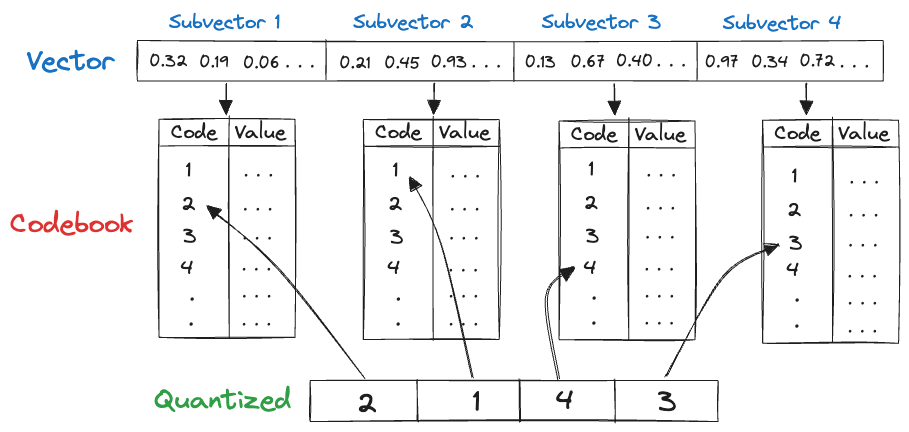 In the above example, the original vector is split into chunks (subvectors), each of which is associated to a centroid. The stored quantization code for this vector
is the concatenation $2 || 1 || 4 || 3$. The original vector required $128$ dimensions $\times 32$-bit integers $ =4096$ bits total,
which has been compressed to $4$ chunks $\times 8$-bit integers $= 32$ bits of quantized storage.
### RaBitQ Quantization (RQ)
RaBitQ is an advanced quantization technique that outperforms PQ in several ways.
It needs no codebook to train, estimates distances very quickly at query-time,
and crucially, quantizes each vector in (with some small overhead) just **one bit per dimension!**
In practice, RaBitQ compresses a $1024$-dimensional `float32` vector into just a few thousand bits, while maintaining good recall.
The inner workings of RaBitQ quantization are rather mathematically dense. It generates a quantization codebook by
applying a uniformly random, approximately distance-preserving orthogonal transformation of the vertices of the $d$-dimensional hypercube,
where $d$ is the dimensionality of the dataset. We defer the details, and an elegant theoretical error bound, to [the original paper.](https://arxiv.org/pdf/2405.12497)
#### Using RaBitQ
Use RaBitQ quantization by selecting quantized index types ending in the suffix `RQ`. For example, call `create_index` with `index_type="IVF_RQ"`.
Note that when using `IVF_RQ`, the dimension of the dataset must be a multiple of `8`.
`num_bits` determines how many bits are used to quantize each dimension.
`1` is the standard RaBitQ setting. Increase to `2`, `4`, or `8` bits to achieve better recall for additional storage and query-time compute.
RaBitQ-quantized indexes computed with `num_bits >= 2` use a newer on-disk layout, and cannot be read by some older LanceDB versions.
See this [blog post](https://lancedb.com/blog/feature-rabitq-quantization/) for further discussion and benchmarking of LanceDB's RaBitQ implementation.
### Scalar Quantization (SQ)
Scalar quantization quantizes each entry of a vector independently, by simply replacing it with the closest of a pre-defined set of values.
In practice, it often uses $8$ bits per dimension of a vector, and supports very fast encoding and decoding.
For example, suppose we know all vector entires across our dataset lie in the range $[-128 \times 10^5, 127 \times 10^5]$.
In this case, we could quantize a given value $v$ as an $8$-bit representation of the integer $j$, where $j \times 10^5$ is the closest value to $v$
among all integral multiples $\{j \times 10^5: -128 \leq j \leq 127 \}$.
## Quantization API Reference
| Parameter | Description |
| :--------- | :-------------------------------------------------------------------------------------------------------------------------------------------------------------------------------------------------------------------------------------------------------------- |
| `num_bits` | Bits per dimension for quantization. Only applies to `IVF_PQ`/`IVF_HNSW_PQ` (default `8`) and `IVF_RQ` (default `1`, RaBitQ) — not used by `IVF_FLAT`/`IVF_SQ`/`IVF_HNSW_FLAT`/`IVF_HNSW_SQ`. Higher values improve accuracy at the cost of additional storage. |
`max_iterations` and `sample_rate` also affect quantizer training, but since they apply to every IVF/HNSW index type (not just quantized ones), they're documented as general [Build-time Parameters](/indexing/vector-index#build-time-parameters) instead. All three are passed as keyword arguments to `create_index`, alongside `index_type`:
{QuantizationCustomParams}
In the above example, the original vector is split into chunks (subvectors), each of which is associated to a centroid. The stored quantization code for this vector
is the concatenation $2 || 1 || 4 || 3$. The original vector required $128$ dimensions $\times 32$-bit integers $ =4096$ bits total,
which has been compressed to $4$ chunks $\times 8$-bit integers $= 32$ bits of quantized storage.
### RaBitQ Quantization (RQ)
RaBitQ is an advanced quantization technique that outperforms PQ in several ways.
It needs no codebook to train, estimates distances very quickly at query-time,
and crucially, quantizes each vector in (with some small overhead) just **one bit per dimension!**
In practice, RaBitQ compresses a $1024$-dimensional `float32` vector into just a few thousand bits, while maintaining good recall.
The inner workings of RaBitQ quantization are rather mathematically dense. It generates a quantization codebook by
applying a uniformly random, approximately distance-preserving orthogonal transformation of the vertices of the $d$-dimensional hypercube,
where $d$ is the dimensionality of the dataset. We defer the details, and an elegant theoretical error bound, to [the original paper.](https://arxiv.org/pdf/2405.12497)
#### Using RaBitQ
Use RaBitQ quantization by selecting quantized index types ending in the suffix `RQ`. For example, call `create_index` with `index_type="IVF_RQ"`.
Note that when using `IVF_RQ`, the dimension of the dataset must be a multiple of `8`.
`num_bits` determines how many bits are used to quantize each dimension.
`1` is the standard RaBitQ setting. Increase to `2`, `4`, or `8` bits to achieve better recall for additional storage and query-time compute.
RaBitQ-quantized indexes computed with `num_bits >= 2` use a newer on-disk layout, and cannot be read by some older LanceDB versions.
See this [blog post](https://lancedb.com/blog/feature-rabitq-quantization/) for further discussion and benchmarking of LanceDB's RaBitQ implementation.
### Scalar Quantization (SQ)
Scalar quantization quantizes each entry of a vector independently, by simply replacing it with the closest of a pre-defined set of values.
In practice, it often uses $8$ bits per dimension of a vector, and supports very fast encoding and decoding.
For example, suppose we know all vector entires across our dataset lie in the range $[-128 \times 10^5, 127 \times 10^5]$.
In this case, we could quantize a given value $v$ as an $8$-bit representation of the integer $j$, where $j \times 10^5$ is the closest value to $v$
among all integral multiples $\{j \times 10^5: -128 \leq j \leq 127 \}$.
## Quantization API Reference
| Parameter | Description |
| :--------- | :-------------------------------------------------------------------------------------------------------------------------------------------------------------------------------------------------------------------------------------------------------------- |
| `num_bits` | Bits per dimension for quantization. Only applies to `IVF_PQ`/`IVF_HNSW_PQ` (default `8`) and `IVF_RQ` (default `1`, RaBitQ) — not used by `IVF_FLAT`/`IVF_SQ`/`IVF_HNSW_FLAT`/`IVF_HNSW_SQ`. Higher values improve accuracy at the cost of additional storage. |
`max_iterations` and `sample_rate` also affect quantizer training, but since they apply to every IVF/HNSW index type (not just quantized ones), they're documented as general [Build-time Parameters](/indexing/vector-index#build-time-parameters) instead. All three are passed as keyword arguments to `create_index`, alongside `index_type`:
{QuantizationCustomParams}